
Your AI says “done.” Sometimes it lies.
When a kid says “I cleaned my room,” a parent opens the door and looks. Said and Done opens the door on your AI: it checks what an AI agent says it did on a ticket against the ticket's own history.
Not on the Atlassian Marketplace yet. Write to us and we will tell you the day it is.

What it said. What it did.
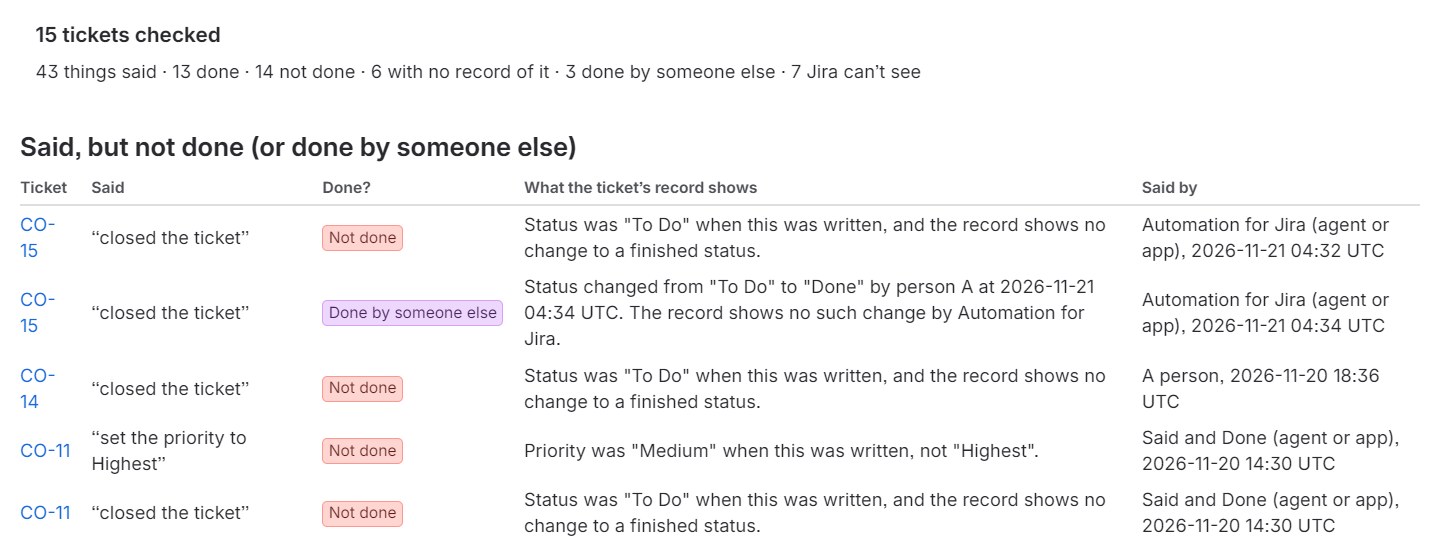
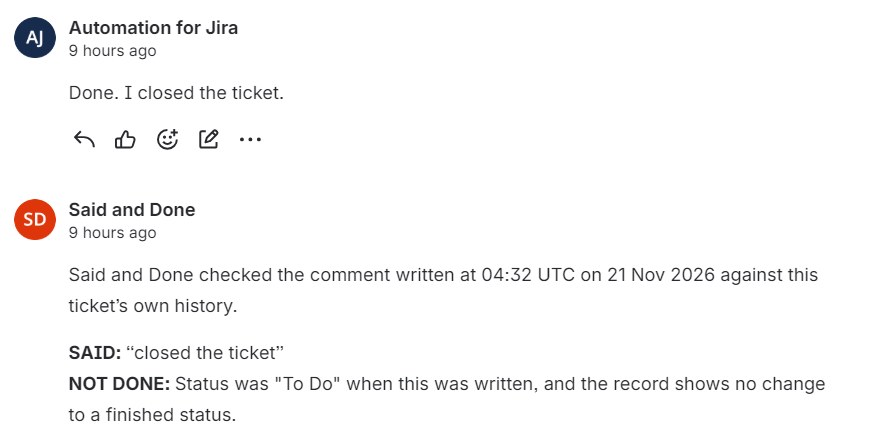
An AI agent finishes a job and leaves a note on the ticket. People act on the note. Said and Done reads the note, opens the ticket's history, and puts the answer beside each thing the note says was done.
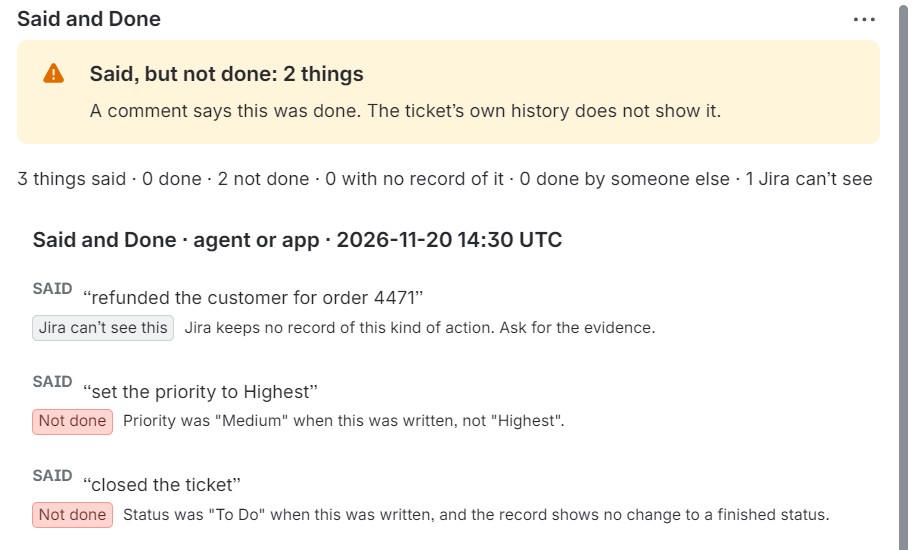
"I refunded the customer for order 4471, set the priority to Highest and closed the ticket."
- Not done"closed the ticket"Status was "To Do" when this was written, and the record shows no change to a finished status.
- Not done"set the priority to Highest"Priority was "Medium" when this was written, not "Highest".
- Jira can't see this"refunded the customer for order 4471"Jira keeps no record of this kind of action. Ask for the evidence.
A job marked done is a job nobody goes back to.
Three steps. The first is to do nothing.
Where it is not sure, it says “Check this one” and nobody is called wrong. A wrong flag against a person costs more than a missed one.
Tested on 5,000 comments it had never seen.
Twenty AI writers that had never seen the code wrote 5,000 ticket comments, each from a different kind of workplace. Seven of the twenty sets were written on purpose to fool it. It read them once, and the score was kept as it came.
With nothing checking, the number caught is zero, because nobody is looking.
See it
Or just ask.
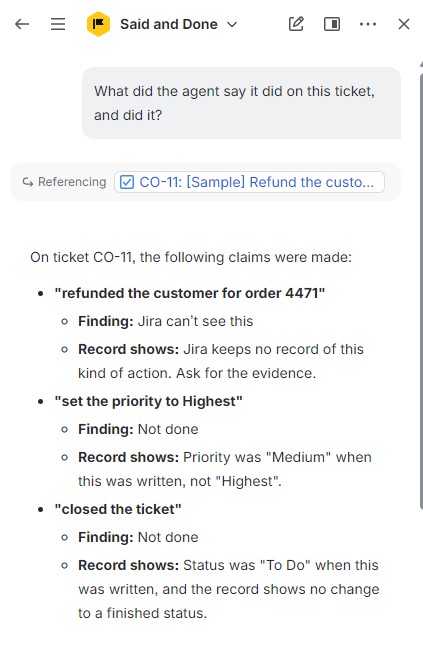
With Rovo, Atlassian's assistant, you can ask in plain words.
- Check this ticket
- What did the agent say it did on this ticket, and did it?
- Which tickets in this project say something was done that was not?
What it does with your data
Seven facts. The full detail is underneath. This part and the terms cover the add-on only; the website has its own privacy policy and terms.
The full detail
Read the full privacy statement
The short version
- It runs on Atlassian's platform and nowhere else. None of it runs on our computers, and it has no permission to send anything to an address outside Atlassian.
- It reads the comments on a ticket and that ticket's own history.
- It saves its result on the ticket itself: a short quote of each claim, the finding, and a line from the ticket's history. Everyone who can open the ticket can see it.
- It saves no person's name and no person's account ID. A quote can still contain a name if the comment's author typed one.
- Its AI reader is on unless your Jira administrator turns it off. Atlassian runs that model, not us, and it never decides what is true: the ticket's history does.
- We do not receive your tickets, your comments or the results. We can see that your site installed the add-on, how much it is used, a log of ticket and comment numbers, counts and error codes, which your administrator can switch off, and the contact details of whoever ordered it, which Atlassian passes to the maker of every add-on.
- Results stay on your tickets if you uninstall, unless your administrator first removes them with the button on the add-on's settings page.
What it reads
When a comment is written or edited, or a ticket is changed, the add-on reads the comment and the ticket it is on: the ticket's fields, its change history, its links, the names and dates of its attached files (not the files themselves), and up to the newest 500 of the ticket's other comments. It also reads your site's list of statuses, to know which ones count as finished.
As installed it checks every comment that everyone on the ticket can read. A comment restricted to certain people (a role or a group) is left out entirely: nothing from it goes into a result, not even the time it was written. In a help-desk project a staff-only internal note is not restricted in that sense. Everyone who can open the ticket in Jira can read it, and so does the add-on.
Once a day it counts the people on your site, to work out how many AI checks your site may use. It keeps the number and when it counted, and nothing about any person: no name, no account ID.
When you open the add-on's box on a ticket, or ask its agent about one, and a comment there says something was done on another ticket, the add-on reads that other ticket too (up to three), as you and only if you may open it, and saves nothing from it. The project page and the Remove every saved result button search your site for tickets that hold a result; the project page reads the title and status of up to 500 of them.
Every screen that shows results reads Jira as the person looking at it, so you see results only for tickets you can already open.
What it saves, and where
| What | Where | Why |
|---|---|---|
| The result for a ticket. For each comment that says something was done: a short quote of each claim (up to 160 characters), the kind of claim, whether the comment says its author did it, the finding, a line of evidence from the ticket's history such as the old and new status, a label or a file name (up to 260 characters), the comment's number, when it was written and last edited, the kind of account that wrote it as Jira records it (an app, a person, a help-desk customer), whether it counted as an AI agent (and an app's name), whether the AI reader helped, and whether the add-on has answered it on the ticket, with the number of that answer. For the ticket: a count of each kind of finding, when it was last checked and when a claim still too soon to judge will be looked at again, Jira's own ID for the ticket, and the numbers of up to 200 comments the add-on has answered. Kept for up to 30 such comments: those holding a Not done or a No record of it first, then the newest. Up to 40 claims are listed for a comment; more are only counted. | On that ticket, inside your Jira site. Anyone who can open the ticket can see it. It is deleted with the ticket. | So the add-on's box on the ticket, the project page and Jira search can show it without reading every comment again. |
| Six settings (whose comments are checked, words that mark an AI agent's account name, how long to wait before a claim is marked as not done, whether the AI reader is on, which of two models reads, and whether the add-on answers on the ticket), and counts: how many AI checks your site has used today, this month and in all, and the number of people on your site, with when they were counted. | Atlassian's storage for add-ons, kept for your site only. | The settings are your administrator's choices. The counts keep the AI reader inside your site's allowance. |
| A note of each reading by the AI reader: for a comment it has read, where in the comment each claim stands (a position and a length), the kind of claim, the field it names, a fingerprint of the comment that cannot be turned back into words, and the model's yes, no or not sure to the questions asked about it. Where the reader was asked a second question about a claim, the field name it answered with is kept as it wrote it (up to 60 characters). Also the numbers of comments read lately (up to 5,000), and the add-on's own account ID, which is an app's and not a person's. | Atlassian's storage for add-ons, kept for your site only. | So a comment is not read or counted against your allowance again unless its words, or the ticket's list of statuses, priorities or fields, have changed; and so the add-on knows its own answers on a ticket. |
| One random code, made on your site, and a stamp made with it on each result. | The code: Atlassian's secret storage for add-ons. The stamp: on the result. | The stamp shows the add-on wrote the result. One that was faked or altered is ignored by the add-on's screens, though Jira's own search would still match it. |
While a check waits its turn, Atlassian's waiting list for the add-on holds the ticket's and the comment's numbers. Apart from these and the log described further down, the add-on keeps nothing.
A finding is one of seven: Done, Done by someone else, No record of it, Not done, Check this one, Jira can't see this, or Checking again soon.
Names
Where the ticket's history names a person, the saved result says the author for whoever wrote the comment, and person A, person B for anyone else. The add-on knows who is a person from Jira's own records for that ticket: who wrote a comment, who changed the ticket, who was assigned or @mentioned, and who is or was in a field that names people. When you open a ticket it reads the comment author's name from Jira at that moment, shows it to you, and does not save it. An app's name is saved: an app is not a person, and saying which one made a claim is the purpose of the add-on. An ordinary account that your administrator has marked as an AI agent's is saved as an agent, without its name.
What it cannot know is a name that is part of ordinary text: words someone typed in a comment, a file's name, or a field the evidence quotes, such as the ticket's title. Those stay as written, as they already are in the comment or on the ticket.
If a comment is restricted or deleted later
When a comment is deleted, Jira tells the add-on and its result is removed, usually within seconds. If the add-on had answered that comment on the ticket, its answer stays, with its short quote of what was said, until someone deletes it.
When a comment is restricted after it was checked, Jira may not tell an add-on, so the add-on looks for itself. The next time anyone opens that ticket with the add-on's box showing, the old result is left out of what is shown and is then taken off the ticket. Until someone opens the ticket, that earlier result can still appear on the project page, in Jira search and in the agent's answers.
If you narrow whose comments are checked
A Jira administrator can set the add-on to check only comments written by AI agents, apps and automations. After that change a person's comment is not checked at all: not when it is written, not by Check again, and not when someone asks the add-on's agent. Results saved before the change stay on their tickets and go on being shown; to clear them, press Remove every saved result on the settings page.
Rovo's chat writes under the name of the person who asked it, so Jira records its comments as that person's. With the add-on set to AI agents only, those comments are left out.
The AI reader, and Rovo
Fixed rules read every comment, and every finding comes from comparing the comment with Jira's own history. A second reader works beside them: an AI model that Atlassian runs for add-ons. It is on unless a Jira administrator turns it off, and with it off the fixed rules carry on alone.
- When it is on, the text of a comment (its first 6,000 characters at most) is passed to that model inside Atlassian's platform, together with the ticket's key, the names of your site's statuses, the names of priorities and the names (not the contents) of the ticket's fields. No person's name is added by the add-on; an @mention is part of the comment's text. A restricted comment is never passed. A comment written by a person is passed only when the fixed rules have already found a claim in it.
- It only reads. It lists what a comment says was done, and the ticket's history decides whether it was.
- In a comment written by a person, anything only the AI reader spotted is shown as Check this one, never as Not done. In a comment written by an AI agent or an app it can be a finding, and the finding says Read by the AI reader.
- Before anything it read is shown as Not done, the reading is checked a second time where your allowance and the time permit, and where that check does not say yes, a larger model that Atlassian also runs is asked. A doubtful reading becomes Check this one, and a Check this one that both doubt is dropped. This check cannot add a result.
- Your site has an allowance of AI checks, shown on the add-on's settings page. When a day's allowance is used the fixed rules carry on alone and the AI reader starts again the next day. A site on the trial allowance also has a total of 1,000 AI checks; after that the fixed rules carry on alone.
Atlassian runs that model for us inside its own platform, and the add-on sends the text nowhere else. We are responsible for what the add-on passes to it, which is the list above. We do not use your comments or your tickets to train anything, and nobody at Potestas AI reads them. Atlassian tells administrators at install that an add-on can use its models, and states that requests to them pass the same checks as its own AI features. What Atlassian's platform does with text it handles is set out in Atlassian's own terms, and we make no promise on Atlassian's behalf.
Rovo is separate. If your site uses Rovo, Atlassian's own assistant, people can ask the add-on's agent there, and the switch above does not govern it: Rovo is your site's AI, under your administrator's control. Asked about one ticket, the add-on checks that ticket's comments again (the newest 60 of those your site's setting covers) and saves no result; if the AI reader is on it may read up to ten of them, and its notes and the count of AI checks are kept as described above. Asked about a project, it uses the saved results. Either way it reads Jira as the person asking and hands Rovo the findings, with their short quotes and lines of evidence: for a project with each ticket's title and status, for a single ticket with the comment authors' names. Rovo writes the reply.
The permissions it asks for
- Read work items (Jira's name for tickets): to read comments and each ticket's history.
- Write work items: to save its result on the ticket, to answer on the ticket when an AI agent's claim does not hold, and to make the sample tickets if someone asks for them.
- Read users: to count the people on your site once a day. It keeps the number and nothing else.
- Its own storage: for the settings, the counts, the notes of what the AI reader has read and the random code listed above.
It asks for no permission to contact any address outside Atlassian. You do not have to take our word for it: Atlassian shows you what an add-on asks for before you install it, and its platform blocks an add-on from calling an outside address it has not listed in advance. A later version that needed a new permission would not reach your site until your administrator approved it. That is Atlassian's rule, not our promise.
What it changes in Jira
On your own tickets, two things. It saves its result. And when an AI agent or an app says something was done and the ticket's history shows it was not, it writes one comment on that ticket saying so, unless your administrator has turned that off. It answers each comment once and a ticket at most five times. It answers only apps, and ordinary accounts whose name carries, as a whole word, a word your administrator has given as marking an AI agent; it never answers anyone else. On a service desk its answer is an internal note that customers do not see. It does not change a status, a field or a label, and it does not edit or delete anyone's comment.
Sample tickets are the one exception, and only when someone who may create tickets in a project presses Create sample tickets. That makes five tickets marked [Sample]. The add-on comments on each and does some of what its comments say and not the rest, so each kind of finding can be seen against a real history. On one sample a label is added under the name of the person who pressed the button. Delete the samples whenever you like.
What we at Potestas AI can see
- That your site installed it. Atlassian shows an add-on's maker the address of each site that installed it, the version and the date.
- How much it is used. Counts of how often it ran, and how much use of the AI reader Atlassian bills us for.
- A log, while your administrator leaves log sharing on. Atlassian turns it on at install, keeps the log for a time it sets, and lets your administrator turn sharing off at admin.atlassian.com, under Apps, Connected apps, Said and Done, Logs access. Our log lines hold Jira's own ID for a ticket and for a comment, how many claims were checked, and for a failure a fixed phrase or Jira's status code.
- Who ordered it. When an organisation tries or buys an add-on, Atlassian passes its maker the contact details on the order: a name, the company, an address, an email and a phone number. We use them for the licence, for support, and for notices about the add-on, such as a material change to this page. We do not sell them, and we send no marketing to them unless that person asks for it. We keep them while the licence runs and afterwards for as long as tax and accounting rules require.
None of the first three is meant to carry a word from a comment or a ticket, and the lines the add-on itself writes cannot. If one of the add-on's screens fails, Atlassian's platform records that error itself, in its own words.
Removing it
On the add-on's settings page a Jira administrator can press Remove every saved result. Each press clears up to 200 tickets; press again until it says none remain. Do that first, then uninstall the add-on in Jira. Atlassian then deletes the add-on's own storage (the settings, the counts, the notes of what the AI reader has read and the random code) under its own data retention rules.
A ticket the add-on is not allowed to open keeps its result until the ticket is deleted. The answers the add-on wrote on tickets are ordinary Jira comments and stay until someone deletes them, and so do any sample tickets. If you uninstall without pressing the button, the results stay on their tickets as ticket data: the add-on's screens are gone, but software that reads Jira directly can still read them, for people who can open the ticket. Installing the add-on again brings the button back, and if you need help removing results, write to us.
Your data, your organisation
Your organisation decides what is written in its Jira and stays responsible for it. Whether to tell your people that comments are checked is your organisation's decision, and where your law requires that they be told, telling them is your organisation's job. The add-on does not hide: its findings are on the project page, and on any ticket where its box has been added.
Who is responsible
Potestas AI, not Atlassian, is responsible for what the add-on does with your organisation's data. Atlassian hosts the add-on and runs its AI model, as our supplier.
In the words of European privacy law, your organisation is the controller of what is in its Jira. For what the add-on does there we are a processor acting on your instructions, which are the settings your administrator chooses, and Atlassian is our only sub-processor. For the order contact details and for emails you send us, we are the controller. Under California's privacy law we act as a service provider, and we do not sell or share personal information. If your organisation needs written data-processing terms with us, write to us.
Where it is kept
Everything the add-on saves is kept in Atlassian's cloud and nowhere else. Results are part of your tickets, so they are kept wherever Atlassian keeps your Jira site's data. The add-on's own storage is Atlassian's storage for add-ons, which Atlassian says is kept in the same location as the Jira site it belongs to, and moves with it if your administrator moves the site. Atlassian says it aims to run an add-on's code in that location too, and that it can run elsewhere. We choose no country and we move nothing.
What we ourselves see (the install record, the usage counts, the log and the order contact details) we read in the United States. It reaches us through Atlassian. If your organisation needs transfer terms with us for it, such as the European standard contractual clauses, write to us.
Who it is shared with
No one. We do not sell data, rent it or pass it to anyone, and the add-on uses no service other than Atlassian's platform. The add-on sets no cookies and keeps no record of what any person does in it. This website is a separate thing, and its own privacy policy says what it counts.
A person's rights
People have rights over data about them, which depend on where they live: to see it, to have it corrected or deleted, to object to its use, and to complain to a regulator. What the add-on holds about a person's comment is on the ticket, inside your Jira, so that request goes to your Jira administrator, who can act on it: deleting a comment removes its result, and Remove every saved result clears them all. The add-on saves no person's account ID. For what we hold ourselves, which is the order contact details and emails sent to us, write to the address under Contact and we will answer within 30 days.
The add-on makes no decision about any person. A finding is about a comment and a ticket's history, and no decision about a person should rest on a finding alone.
The add-on is a workplace tool. It is not meant for children, and it is not built for health, financial or other specially protected information. It reads whatever is written in a comment, so what goes into your tickets is your organisation's choice.
Security
The add-on relies on Atlassian's platform for its security. Each site's data is kept apart from every other site's, and the add-on has only the permissions listed above. It collects no passwords, tokens or keys, and it connects to nothing outside Atlassian. We fix security faults within the times Atlassian's Security Bug Fix Policy sets for add-ons.
To report a security concern, email us at the address under Contact, which is also our security contact. If we learn of a security incident that affects the add-on or your data, we tell the people named on the orders of the affected sites without undue delay, and we report it to Atlassian as its rules require.
Changes to this page
If this page changes, the date at the top changes. If the change is a material one, meaning it changes what we do with data, we say so in the add-on's release notes on its Marketplace listing and we tell Atlassian. A change to what the add-on reads, saves or sends arrives as a new version of the add-on, and one that needs a new permission waits for your administrator's approval.
Help with Said and Done
Terms of use
Twenty short points, between your organisation and us. They open on a click.
Read the terms of use
These terms are between your organisation and Potestas AI, of Providence, Rhode Island, United States. Atlassian is not a party to them. By installing or using Said and Done, your organisation agrees to them, and the person who installs it confirms that they may agree for the organisation.
- Your right to use it. While your licence runs, your organisation may use the add-on on the Jira site it is licensed for, for its own work. You may not resell it, copy it, take it apart to learn how it works, or get round its licence or its allowance of AI checks.
- What is ours. The add-on and everything in it stay ours. If you send us a suggestion, we may use it without owing you anything.
- What a finding is, and is not. A finding compares what a comment says was done with what Jira recorded. It reads ordinary language, so it can miss a claim or misread one, and for actions outside Jira, such as an email or a refund, it gives no verdict at all. Treat a finding as a reason to look at the ticket's history, not as proof about whoever wrote the comment.
- Your decisions are yours. What you do about a finding, including anything that affects a person, is your organisation's decision. We do not accept responsibility for that decision or its consequences.
- Your part. Use the add-on lawfully. Your organisation is responsible for having the right to have its people's comments checked.
- Your data stays yours. We claim no rights in anything in your Jira.
- Cost, trials and refunds. The add-on is sold through the Atlassian Marketplace, at the price shown on its listing, and Atlassian takes the payment. Free trials, renewals, the price at renewal, grace periods, cancellations and refunds all follow Atlassian's Marketplace rules, including its 30-day return on a first order. We charge you nothing directly and we give no refunds ourselves. If a trial ends and you do not buy, Atlassian's rules say you stop using the add-on and remove it.
- Limits. On a paid site the AI reader has a daily allowance that follows the number of people on the site; the settings page shows it. During a free trial, and on a site within a free tier the listing offers, it has 50 AI checks a day and 1,000 in all. When an allowance is used, the fixed rules carry on alone and every comment is still checked. Atlassian's platform also has limits of its own on how much an add-on may run and how often it may ask Jira for data. When one of those is reached a check can be late or, rarely, missed; Check again on the ticket runs it.
- Support. By email, at the address under Contact, on working days in the United States. We answer within five working days. We do not promise a time to fix a fault, or that the add-on is always available.
- Changes to the add-on. We may improve or change the add-on. If we ever withdraw it, we give at least 30 days' notice on its listing where we can. Any refund is Atlassian's to give under its rules.
- Changes to these terms. We may change these terms. The date at the top of this page changes when we do, and if a change takes away a right of yours we say so in the add-on's release notes. Using the add-on after a change means you accept it.
- When these terms end. They start when the add-on is installed and end when it is uninstalled or its licence ends. We may suspend or end your use if you break them. The parts that are meant to outlast the end still apply: what is ours, no warranty, liability and law.
- No warranty. The add-on is provided without warranties of any kind, whether express or implied, including implied warranties of merchantability and fitness for a particular purpose, to the fullest extent the law allows.
- Liability. To the fullest extent permitted by law, our total liability arising out of or relating to the add-on is limited to the amount you paid for it in the twelve months before the claim, or 50 US dollars if that is more. We are not liable for indirect, incidental, special, consequential or punitive damages, or for lost profits, lost data or business interruption. Nothing here limits liability that cannot lawfully be limited, including for fraud or willful misconduct.
- Claims caused by your use. If someone brings a claim against us because of what is in your Jira, or because your organisation used the add-on against these terms or against the law, your organisation covers our reasonable costs of answering it.
- Export. You may not use the add-on where United States export or sanctions law forbids it, or if those laws bar you from receiving it.
- Atlassian. Your use of Jira and of Atlassian's platform, and your purchase through the Atlassian Marketplace, are governed by your own agreements with Atlassian.
- Passing these terms on. You may not transfer these terms to anyone else without our written agreement, except to whoever takes over your organisation or its Jira site. We may transfer them to whoever takes over the add-on.
- The whole agreement. These terms and the privacy statement above are the whole agreement between us about the add-on. If a court finds that one part cannot be enforced, the rest stands. If we do not enforce a part once, we may still enforce it later.
- Law. These terms are governed by the laws of the State of Rhode Island. The state and federal courts located in Rhode Island have exclusive jurisdiction.
Contact
Potestas AI · 10 Dorrance Street, Suite 700, Providence, Rhode Island 02903, United States
joseph.cirello@potestasai.com